
Product
(c) BabyLook SIP (en)
BabyLook is a baby monitor software application.
Why BabyLook.
- Existing telephone sets whether analog or digital can be used.
- Signaling to home phones and / or public phones (mobile phone).
- No mounting or installation of facilities in the room necessary.
- Logging operation activities.
- Activation by dialing a number.
- Speech-controlled.
How it works
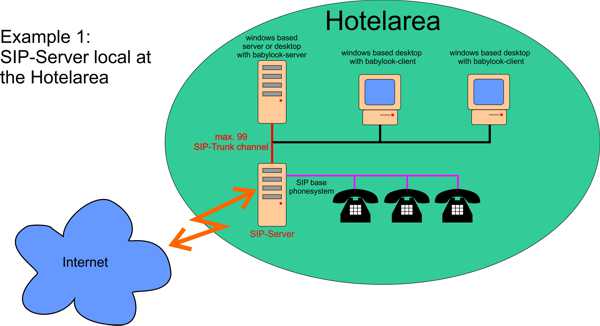
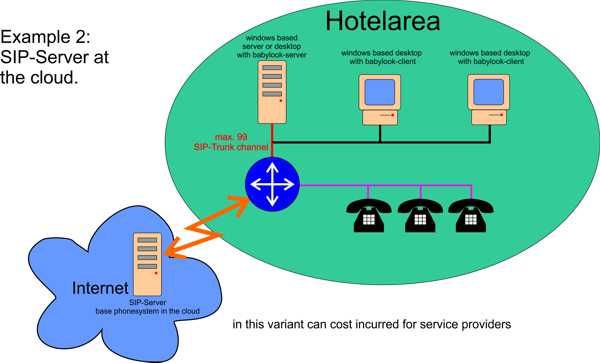
The existing telephone system is connected via SIP (SIP trunk or SIP user) to a PC.
The client is set up the room number and the corresponding alarm number and an emergency number. Selects the guest bundle number of the baby phone's, a SIP channel is occupied* and switched after a desired time monitoring. The guest puts the phone next to the camera or go to speakerphone. As long as a telephone connection is the volume will be monitored.
Does the volume level for a certain time* a selectable threshold, the alarm number is called. After the called party is first given, and then switched on for an adjustable time* to room monitoring (listening) an announcement.
If the alarm call number at any report, the process is repeated until the called party answers, or the emergency number is called.
After replacing the subscriber is switched back on monitoring after a timeout.
All operations are logged.
* (all times are adjustable)
Attention!
- BabyLook can assist you in monitoring your child, but cannot relieve you of the responsibility for the welfare of your child!
- BabyLook is no emergency facility!
- The use of BabyLook is prohibited if it infringes applicable laws.
- The quality of supervision is exclusively dependent on the hardware used.
Functional diagrams
Specification:
- BabyLook consists of: BabyLookSipServer and BabyLookSipClient.
- BabyLook was developed under Visual Studio 2008 from Microsoft, .NET Framework 3.5 and the SIP stack of Lumisoft.
- BabyLookSipServer runs as an application under Windows 7, 8, 10, Windows Server 2008, 2012 (R2), 2016, 2019.
- BabyLookSipServer is connected over TCP/IP network to a PBX.
- A maximum of 99 SIP channels can be set up.
- For each room (phone) monitored at the same time one SIP channel is set up; in addition, at least one SIP channel is needed for alerting (outgoing calls to the alarm number). A sufficient number of SIP channels (about 10% of the monitored rooms) should be reserved for alarming.
- The SIP channels can be set up as a SIP trunk or SIP users.
- As codecs PCMA and PCMµ (G.711) are available.